Results and charts
The results table
tinydistill eval RUN writes RUN/results.md and RUN/results.json with a row for the teacher and every form
of the student (PyTorch, ONNX, int8), plus the baseline and upper bound when trained:
- Quality: accuracy and macro-F1 on the gold-labelled test texts, and agreement with the teacher. Tasks with more than five labels also get top-3 accuracy; multi-label tasks micro-F1 and exact-match accuracy; ordered labels the mean distance in label steps.
- Speed and size: latency at batch 1 and 32, throughput, and size; the teacher is timed on each device in
--teacher-devices. - Cascade: accuracy and mean latency when the student passes its least confident texts to the teacher (see Deploying).
tinydistill compare RUN1 RUN2 ... puts runs in one table, and tinydistill report RUN rebuilds the Markdown
from the JSON.
Charts
tinydistill plot RUN (with the plot extra) writes the charts of a run to RUN/plots/. In Python each chart is
a function in tinydistill.plots that returns a matplotlib figure.
| Chart | What it shows |
|---|---|
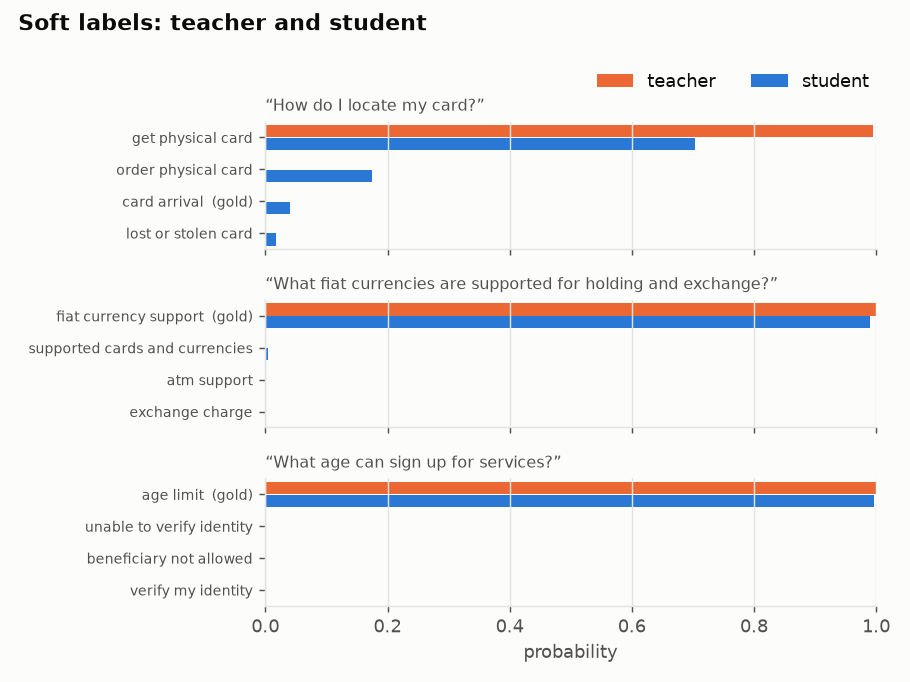
soft_labels |
for a few test texts, the teacher's probabilities (the soft labels) next to the student's |
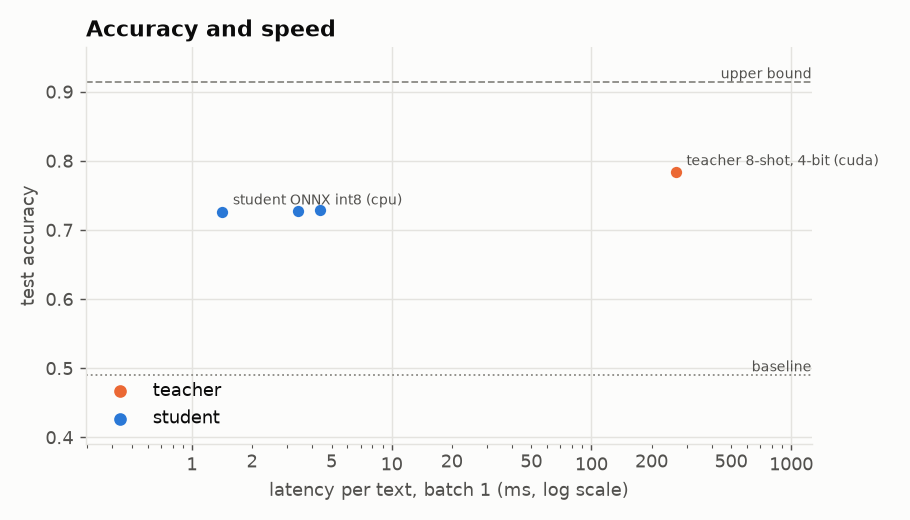
speed_accuracy |
accuracy against latency for the teacher and every form of the student, with the baseline and upper bound |
training |
the loss per epoch on the training texts and, with --val-share, on the held-out texts and the kept epoch |
per_label |
F1 of every label for teacher and student, the teacher's weakest first |
confusions |
the confusion matrix over the labels involved in the most mistakes |
cascade |
accuracy as the student passes more of its least confident texts to the teacher |
Error analysis
tinydistill analyse RUN writes RUN/analysis.html: precision, recall and F1 of every label for the teacher
and the student, the most common confusions with example texts, and texts where the two disagree. A label the
teacher gets wrong often usually needs a clearer name, a description, or merging with the label it is confused
with.